The entire setup is one paste. Claude’s settings, add a custom connector,
give it https://mcp.odooconsole.com/mcp, done. No API key, no client ID,
no per-instance URL. The first time you watch it work it looks like
something must be missing.
Nothing is missing. The configuration you’d expect to do by hand is specified protocol behaviour, and the client does all of it in the couple of seconds after you click Add. I traced the whole thing with curl below, partly because it’s a nice piece of protocol design and partly so you can see there’s no magic in it.
The part you see
Settings → Connectors → Add custom connector. Name it whatever you want. The URL is the same one for every OdooConsole instance:
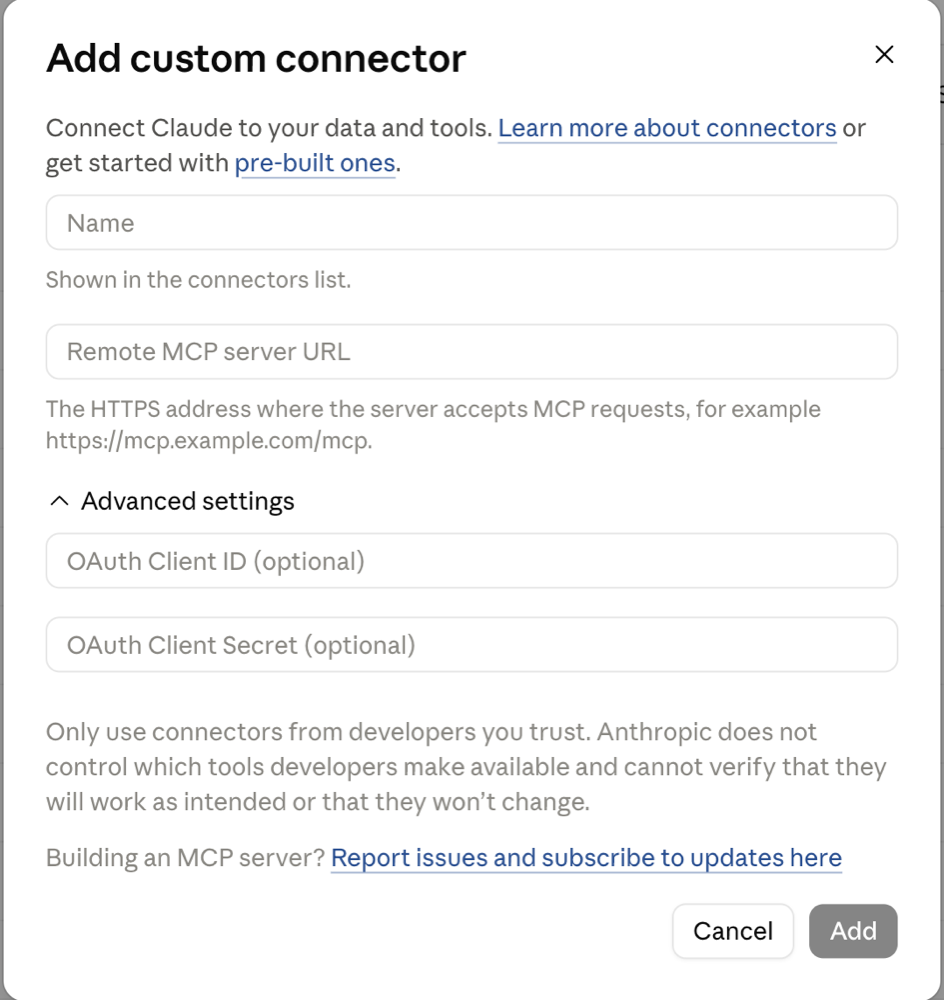
Click Add and Claude sends you to a consent screen on
auth.odooconsole.com. This screen is where you pick which of your
instances the connector can reach — that choice lives in the grant, not in
Claude’s settings, which is why the URL never needs to change. Approve, and
Claude can work that instance’s ERP: search records, draft invoices, check
stock, install modules, whatever the scopes you approved allow.
Cursor, VS Code and ChatGPT go through the identical steps. None of this is Claude-specific.
The part you don’t
So how does a client that only knows a URL figure out where to log in? It asks, and gets told. Watch:
$ curl -si https://mcp.odooconsole.com/mcp -X POST \
    -H 'content-type: application/json' \
    -d '{"jsonrpc":"2.0","id":1,"method":"initialize"}'

HTTP/2 401
www-authenticate: Bearer realm="https://mcp.odooconsole.com",
  resource_metadata="https://mcp.odooconsole.com/.well-known/oauth-protected-resource"
A 401, but with directions. The WWW-Authenticate header points at a
metadata document — this is RFC 9728,
which MCP’s auth spec builds on. Fetch it and you get the map:
$ curl -s https://mcp.odooconsole.com/.well-known/oauth-protected-resource
{
  "resource": "https://mcp.odooconsole.com",
  "authorization_servers": ["https://auth.odooconsole.com"],
  "scopes_supported": ["odoo:read", "odoo:write",
                       "instances:read", "instances:write"],
  "bearer_methods_supported": ["header"],
  "resource_documentation": "https://www.odooconsole.com/docs/mcp"
}
Now the client knows who the authorization server is. It registers itself there on the fly (RFC 7591 — that’s why there was no client ID to paste), runs a normal authorization-code flow with PKCE, and lands you on the consent screen. Four steps, all discovered, none configured.
Two kinds of grant, on purpose
The consent screen offers two different things, and the difference matters more than it looks:
| Grant | Scopes | Reaches |
|---|---|---|
| One instance | odoo:read, odoo:write |
That instance’s records, models and views |
| The account | instances:read, instances:write |
Create, restart, inspect, delete instances. No route to any instance’s data |
These are separate credentials from separate consent flows. The reason is
prompt injection: sooner or later an agent reads text that someone else
wrote into your ERP — an invoice description, a delivery note. The token
doing that reading carries no provisioning scopes, so hostile text in a
record can’t talk its way to delete_instance. I wrote up the full
reasoning in the tenancy post; the short
version is that scopes on a single credential aren’t much of a boundary
when a language model is the one picking tools.
Adding a second instance later means authorising a second connector. You change nothing in Claude. Same URL.
Try it
The free tier covers the whole loop: create an instance, paste the URL into Claude, ask it what’s in your ERP. If anything surprises you, the MCP reference documents every tool and every error — including that 401 up top, which is the only error a healthy connection should ever show you.